



Starting your first website often means purchasing several services that appear to do the same job. A hosting company may advertise a package that includes a free domain, website hosting, email, SSL, backups, and a website builder, all under one monthly price.
This can make it seem as though a domain name and web hosting are the same product.
They are not.
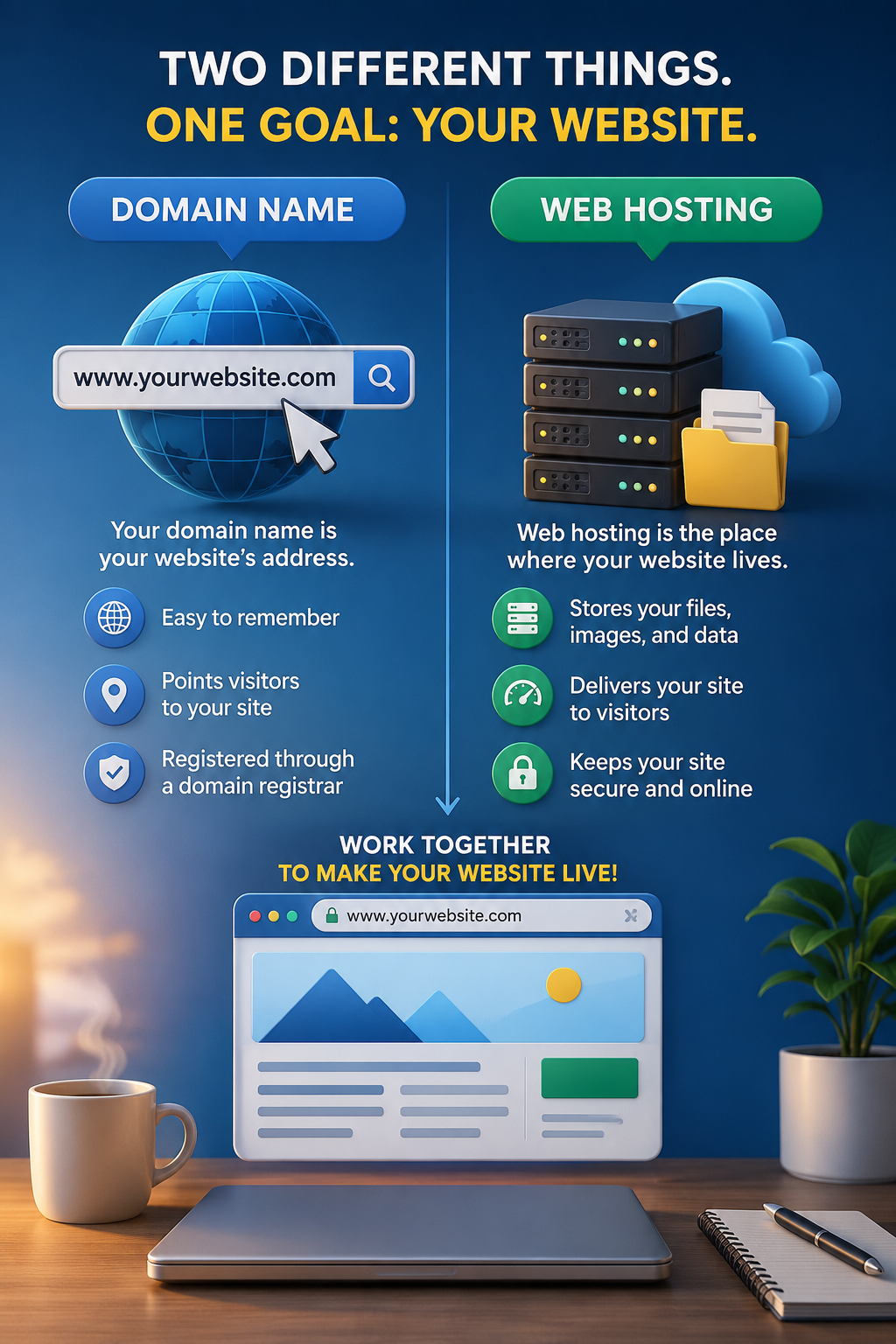
A domain name gives people a recognizable way to find your website. Web hosting provides the server resources used to store and deliver the website itself. Most websites need both, but the two services can be purchased separately and managed by different companies.
Understanding the difference between a domain name and web hosting can help you choose a suitable package, avoid unexpected renewal costs, and keep control of an important business asset.
Domain Name vs Web Hosting at a Glance
| Feature | Domain Name | Web Hosting |
|---|---|---|
| Main purpose | Gives your website a recognizable address | Stores and delivers your website |
| Example | example.com | Server space containing site files and databases |
| Purchased from | Domain registrar or reseller | Hosting provider |
| Usually renewed | Annually or for multiple years | Monthly, annually, or for multiple years |
| Can be purchased separately | Yes | Yes |
| Can be moved to another provider | Usually, subject to transfer rules | Yes, through website migration |
| Required for a public website | Usually, although temporary addresses and subdomains exist | Yes, unless the site uses a fully hosted platform |
The simplest way to remember the difference is this:
Your domain name is the address people enter.
Your web hosting is the place where the website operates.
What Is a Domain Name?
A domain name is the human-readable address used to reach a website, such as:
example.com
Without domain names, visitors would often need to use numerical IP addresses to locate online services. The Domain Name System, commonly called DNS, connects readable domain names with the technical addresses computers use to find resources online. (ICANN)
A domain name is only one part of a complete URL.
For example:
https://example.com/blog/article
In this address:
https
is the protocol,
example.com
is the domain name, and
/blog/article
is the path to a specific page.
Registering a Domain Name
You do not permanently purchase a domain name in the same way that you purchase a physical object. You register the right to use it for a specified period under an agreement with a registrar.
ICANN explains that the person or organization registering the domain is known as the registrant. The registrar processes the registration and provides the account through which the registrant manages settings, renewals, and transfers. (ICANN)
This distinction matters because your domain can stop working if:
- The registration expires
- Renewal payment fails
- Your account information is incorrect
- You lose access to the registrar account
- DNS settings are changed incorrectly
- The domain is suspended under applicable registration terms
Registering a domain does not automatically create a website. ICANN compares a domain to a street address: the address can exist, but there must still be somewhere for visitors to arrive. (ICANN)
What Is Web Hosting?
Web hosting is the service that supplies the server resources needed to store and deliver your website.
Depending on the type of website, hosting may contain:
- HTML, CSS, and JavaScript files
- Images and downloadable files
- A content management system such as WordPress
- A database
- Themes and plugins
- Email accounts
- Backup files
- Security and caching tools
When someone enters your domain name, DNS helps direct the request toward the correct hosting environment. The server then sends the appropriate website files and data to the visitor’s browser.
A hosting package may also include tools such as:
- A hosting control panel
- WordPress installation
- SSL certificates
- Automated backups
- Website migration
- Malware scanning
- Caching
- Content delivery network integration
- Email hosting
- Customer support
These features vary by provider and plan. A feature described as included may also have limits, renewal charges, or additional conditions.
For a broader explanation of how servers deliver websites, read:
Internal Link: What Is Web Hosting? A Beginner’s Guide to How Web Hosting Works
How Domain Names and Web Hosting Work Together
A domain name and hosting perform different jobs, but they must be connected correctly.
Imagine opening a small store.
The domain name is similar to the store’s address. It helps customers locate the business.
Web hosting is similar to the building and the space inside it. It holds the products, shelves, signs, equipment, and everything customers interact with when they arrive.
Registering only the address does not create the store. Renting a building without providing customers with an address makes the business harder to find.
A functioning website usually requires:
- A registered domain name
- An active hosting account
- Correct DNS settings connecting the domain to the host
- Website files or a content management system installed on the hosting account
Once those parts are connected, visitors can enter the domain and reach the website stored on the server.
Do You Have to Buy the Domain and Hosting from the Same Company?
No.
You can register your domain with one company and purchase hosting from another.
For example, you could:
- Register the domain with a dedicated domain registrar
- Buy hosting from a separate hosting provider
- Connect them by changing nameservers or DNS records
You can also buy both services from one provider as part of a bundled package.
Both arrangements can work well. The better option depends on how much convenience, control, and account separation you want.
Buying the Domain and Hosting from the Same Company
Purchasing both services from one provider is often easier for beginners.
Possible advantages
- One account to manage
- One billing dashboard
- Simpler initial setup
- DNS may be configured automatically
- Support can see both services
- Some hosting packages include the first year of domain registration
This can reduce the number of technical steps needed when launching a first website.
Possible disadvantages
- The free domain may only apply during the first term
- Domain renewal may cost more than expected
- Moving the domain or website later may require additional steps
- The domain may be harder to manage if the hosting account is suspended
- Account access problems can affect both services at the same time
A bundled package is not automatically a bad choice. It simply needs to be evaluated as two separate services, even when they appear on one invoice.
Buying the Domain and Hosting from Different Companies
Keeping the domain and hosting with separate providers can give you more flexibility.
Possible advantages
- You can change hosting without transferring the domain
- Hosting problems are less likely to affect domain account access
- You can choose a registrar based on domain management features
- You can choose hosting based on performance and support
- The domain can remain in one account while the website moves between hosts
Possible disadvantages
- You must manage two accounts
- Billing dates may be different
- DNS setup requires more attention
- Support teams may refer you to the other provider when troubleshooting
- Beginners may find nameserver and DNS settings confusing
Separate providers can be useful for a business owner who expects to change hosting later. However, the separation only helps when account records, login information, and renewal reminders are managed carefully.
Domain Transfer and Website Migration Are Not the Same
This is another common source of confusion.
A domain transfer moves the management of a domain registration from one registrar to another.
A website migration moves website files, databases, email data, or applications from one hosting environment to another.
You can migrate a website without transferring the domain.
You can also transfer a domain without moving the website.
For example, you may keep your website on the same server but move the domain registration to a registrar with better account controls. Alternatively, you may leave the domain with its current registrar and point it toward a new hosting provider.
ICANN states that domain registration terms, including fees, renewals, and transfer conditions, are governed by the agreement between the registrant and registrar. (ICANN)
Before changing either service, identify whether you need to move:
- The domain registration
- The website
- The email service
- The DNS service
- Or all of them
Moving the wrong component can cause unnecessary downtime or email disruption.
What Costs Should You Prepare For?
The advertised hosting price is rarely the only cost involved in running a website.
Your budget may need to include the following.
Domain registration
A domain is normally registered and renewed separately from hosting, even when both appear in the same package.
The price may depend on:
- The domain extension
- The registrar
- The initial registration term
- Renewal pricing
- Premium domain status
- Privacy or security services
- Local taxes and fees
A low first-year price does not guarantee a low renewal price.
Web hosting
Hosting may be billed:
- Monthly
- Annually
- Every two years
- Every three or four years
Long contracts often display a lower equivalent monthly price, but the full term may need to be paid in advance.
Check:
- The total amount due today
- The contract length
- The regular renewal rate
- Whether renewal is automatic
- The cancellation policy
- The refund period
- Whether upgrades begin a new billing term
SSL certificate
Many modern hosting packages include a basic SSL certificate at no additional cost. However, some plans or specialized certificates may have separate fees.
Verify whether SSL:
- Is included
- Renews automatically
- Covers the required domain and subdomains
- Requires manual installation
- Is only free during the introductory period
Email hosting
A hosting package may include email accounts, provide a limited mailbox, or require a separate email subscription.
Check:
- Number of mailboxes
- Storage per mailbox
- Spam filtering
- Webmail access
- Mobile and desktop compatibility
- Backup or retention rules
- Renewal cost
Backups
The word “backups” can describe very different services.
A plan might offer:
- Daily backups
- Weekly backups
- Manual backups only
- Limited retention
- Paid restoration
- Backups stored on the same hosting account
- Backups available only on higher-tier plans
Check both the backup frequency and the restore process.
Website migration
Some hosts include migration assistance, but the service may be limited by:
- Number of websites
- Website size
- Supported control panels
- Supported platforms
- Email migration
- Deadline after account purchase
- Complexity of the existing website
Do not assume that “free migration” covers every part of your current setup.
Website software and extensions
WordPress itself can be used without a software license fee, but premium themes, plugins, page builders, security tools, and backup services may add recurring expenses.
Privacy and security services
Depending on the provider, additional charges may apply for:
- Domain privacy
- Malware removal
- Advanced firewalls
- Premium SSL
- Security monitoring
- Automatic updates
- Advanced backup retention
Some services are useful. Others may duplicate features already included in the hosting plan.
What Does a Free Domain with Hosting Usually Mean?
A “free domain” normally means the provider covers the initial registration cost under specific conditions.
It may require:
- A qualifying hosting plan
- An annual or longer contract
- A specific domain extension
- Registration during the initial purchase
- Payment for certain taxes or fees
- Renewal at the normal domain price after the first term
The offer does not necessarily mean the domain remains free for as long as you use the hosting service.
Before accepting the offer, determine:
- Who will be listed as the registrant
- Which extensions are eligible
- The price after the free period
- Whether domain privacy is included
- Whether the domain can be transferred
- What happens to the domain after a hosting refund
- Whether cancellation creates a nonrefundable domain charge
The most important point is that the domain should be registered in your name or your business name, with contact information and login access that you control.
What to Check Before Buying a Domain and Hosting Bundle
A bundle can simplify setup, but the details should be reviewed before payment.
1. Confirm ownership and account control
Make sure you will control:
- The registrar account
- The registrant information
- The hosting account
- DNS settings
- Administrative email addresses
- Renewal settings
Avoid allowing a designer, freelancer, agency, or unrelated third party to register the domain under an account you cannot access.
2. Check both introductory and renewal prices
Record the regular renewal price for:
- The domain
- Hosting
- Backups
- Security tools
- Premium support
- Other add-ons
The first invoice may be much lower than future renewals.
3. Check the contract length
A price advertised as a monthly amount may require payment for several years upfront.
Look for:
- Total payment due
- Length of the initial term
- Automatic renewal term
- Whether renewal switches to a shorter or longer period
- Whether the price changes during an upgrade
4. Review the refund policy
Find out whether the refund includes or excludes:
- Domain registration
- Setup fees
- Migration
- Premium support
- Add-ons
- Email services
- Third-party licenses
A hosting refund may not return the cost assigned to the domain registration.
5. Check transfer and migration options
Before committing, confirm that you can later:
- Transfer the domain to another registrar
- Change nameservers
- Edit DNS records
- Download website files
- Export the database
- Download email data
- Generate a full account backup
- Migrate without paying an excessive exit fee
6. Understand the resource limits
Terms such as “unlimited” may still be governed by acceptable-use rules or technical restrictions.
Review limits for:
- Storage
- Monthly traffic
- Number of websites
- Databases
- Email accounts
- CPU
- Memory
- Inodes or file counts
- Backup storage
- Concurrent processes
7. Check what support actually covers
Support may assist with server problems but not with:
- Theme customization
- Plugin conflicts
- Website design
- Search engine optimization
- Custom coding
- Malware cleanup
- Third-party email software
Look for clear descriptions of support scope and communication channels.
8. Remove unnecessary add-ons
Hosting checkout pages may preselect optional services.
Review each item before paying, including:
- Premium SSL
- Domain privacy
- Search engine submission tools
- Advanced backups
- Security scanning
- Business email
- Website builders
- Priority support
Only pay for services that solve a real need and are not already included elsewhere.
Should You Keep Your Domain Separate from Your Hosting?
There is no single correct choice for every website.
Keeping them together may be appropriate when:
- You are building your first small website
- You value simple setup
- The provider clearly explains renewal pricing
- You control the account and registrant details
- Moving the domain later is permitted
- Support quality is more important than account separation
Keeping them separate may be appropriate when:
- The domain represents an important business asset
- You manage several websites
- You expect to change hosting providers
- You want centralized domain management
- You prefer to reduce dependence on one company
- Your hosting plan is temporary or experimental
For a serious business website, separating the domain from hosting can make future hosting changes easier. However, a well-managed bundle can also be perfectly workable.
The key issue is not whether the services are together or separate. It is whether you understand the terms and retain control.
Common Beginner Mistakes
Assuming a domain includes a website
A domain registration alone does not include website files, design, content, or server space.
Assuming hosting includes permanent domain ownership
A free first-year domain still needs renewal and remains subject to registration terms.
Looking only at the promotional price
The initial rate may apply only to the first contract.
Registering the domain under someone else’s account
This can make future access, transfer, and ownership disputes much more difficult.
Forgetting to renew the domain
An active hosting account cannot compensate for an expired domain.
Cancelling the old host too early
When moving a website, keep the old service active until the new website, DNS, SSL, and email have been tested.
Confusing migration with transfer
Moving the website does not automatically move the domain registration, and transferring the domain does not automatically copy the website.
A Simple Buying Checklist
Before purchasing a domain and hosting package, confirm the following:
The domain will be registered in my name or business name.

I will control the registrar and hosting login details.

I know the domain renewal price.

I know the hosting renewal price.

I understand the full contract length.

I know which services are included and which are optional.

I understand the backup and restore policy.

I can edit DNS and nameserver settings.

I can transfer the domain if needed.

I can download or migrate the website.

I understand the cancellation and refund terms.

I have removed unnecessary checkout add-ons.
Save a copy of the invoice, registration agreement, account details, and renewal dates in a secure place.
Frequently Asked Questions
Can I have a domain without web hosting?
Yes. You can register a domain and leave it unused, park it, redirect it to another site, or connect it later.
Can I have web hosting without a custom domain?
Yes. Some hosting providers supply a temporary URL or subdomain. This can be useful during development, but a custom domain is usually better for a public business website.
Can one domain connect to more than one service?
Yes. Different DNS records can connect the domain to a website, email provider, verification service, subdomains, and other tools.
Can I change hosting companies and keep my domain?
Yes. You can normally keep the domain with its current registrar and update its DNS settings so it points to the new hosting provider.
Can I transfer my domain to my hosting company?
Usually, provided the domain is eligible for transfer and the required account and authorization steps are completed. Check the registrar’s current transfer rules before beginning.
Will changing hosting affect my email?
It can. Email may be hosted with the website host, domain registrar, or a separate email provider. Review the DNS records and copy any required mailbox data before making changes.
Is a free domain worth accepting?
It can be useful when the eligible extension, renewal price, transfer terms, and account ownership are acceptable. Judge it by the long-term conditions, not only the first-year discount.
Final Decision
A domain name and web hosting are separate services with different responsibilities.
The domain gives visitors an address they can remember. Hosting stores and delivers the website they see after arriving.
You may buy both from one provider for convenience or keep them separate for greater flexibility. Either approach can work when you control the accounts, understand renewal prices, and know how the two services are connected.
Before buying a bundled package, look beyond the introductory price. Check domain ownership, regular renewal costs, contract length, transfer rights, backup policies, email terms, resource limits, and cancellation conditions.
The best arrangement is not necessarily the cheapest or the most complicated. It is the one that gives your website the services it needs while allowing you to maintain control as the site grows.
✅ Last Updated on August 1, 2026 by GET Great Picks Team